Unlocking the Potential of Stickers «Cat and Coffee» for Your Creative Projects
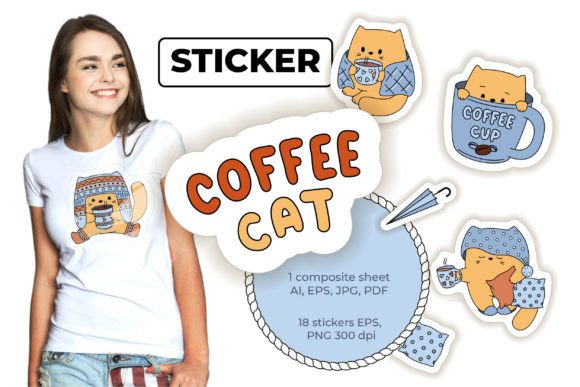
In the bustling world of digital design and handmade crafts, finding assets that strike the perfect balance between whimsy and professionalism can be a challenge. The Stickers «Cat and Coffee» collection offers a delightful solution, merging two universally loved themes into a cohesive set of 18 elements. Whether you are a seasoned graphic designer, a small business owner launching a new product line, or a hobbyist looking to personalize your planner, this set provides the versatility needed to elevate your work. However, simply downloading a pack of cute graphics is not enough; understanding how to leverage the specific file formats and resolutions included is crucial for achieving high-quality results.
This collection is more than just a few images; it is a comprehensive toolkit. You receive a package containing one composite sheet with all elements in versatile formats like AI, EPS, PDF, and JPG. Additionally, there are eight basic cat stickers provided in both EPS and PNG formats, along with ten additional small stickers available as a single EPS sheet and individual high-resolution PNGs. All PNG files are saved at 300 DPI, ensuring crisp prints, while the vector EPS files allow for infinite scalability without loss of quality. Despite these robust features, many creators overlook critical details during the selection and application process, leading to avoidable frustrations.
Avoiding the Resolution Trap in Print Projects
One of the most common misunderstandings among beginners involves the difference between screen resolution and print resolution. When working with digital assets for physical products—such as wrapping paper, packaging design, or greeting cards—it is tempting to grab the first image file available. A frequent mistake is using the JPG from the composite sheet for large-scale printing without verifying its dimensions. While convenient for web previews, raster images like JPGs can become pixelated if enlarged beyond their original size.
To ensure your Cat and Coffee designs look professional on textile designs or notebooks, you must prioritize the 300 DPI PNG files or, even better, the vector EPS files. The 300 DPI standard is the industry benchmark for sharp, clear printing. If you ignore this and use a low-resolution web export, your final product may appear blurry or amateurish, which can negatively impact customer satisfaction if you are selling these items. Always check the file properties before sending anything to a printer. For the best outcome with the eight basic cat stickers, utilize the dedicated PNG files provided, as they are optimized specifically for high-quality output.
The Power of Vector Editing and Common Oversights
The inclusion of EPS and AI files in this archive is a significant advantage, yet it is often underutilized by those unfamiliar with vector graphics. A typical error occurs when a user treats these files like standard photographs, attempting to edit them in software meant only for raster images, or worse, ignoring them entirely because they seem "too technical." By bypassing the vector files, you lose the ability to easily edit colors, resize elements infinitely, or separate layers for complex compositions.
For entrepreneurs and marketers creating brand assets, this limitation can be costly. Imagine needing to match the coffee cup in the sticker to your specific brand color palette. If you rely solely on the flattened PNGs, you are stuck with the original colors. However, by opening the vector EPS files in software like Adobe Illustrator or CorelDRAW, you gain full control. You can recolor the cat's fur, adjust the steam rising from the coffee, or isolate specific elements to create unique patterns for fabric or wallpaper. Taking the time to learn the basics of vector editing transforms this sticker set from a static image library into a dynamic design resource.
Maximizing Versatility Across Different Mediums
Another area where creators often stumble is failing to plan for cross-platform consistency. You might design a beautiful invitation card using the Cat and Coffee stickers, only to find that the same assets look disjointed when applied to your website or social media headers. This usually happens when the wrong file format is chosen for the medium. For web design and digital notes, the PNG files with transparent backgrounds are ideal because they load quickly and blend seamlessly with any background color.
Conversely, using PNGs for large format textile design can result in massive file sizes that slow down production workflows. In this scenario, the composite sheet in PDF or the individual EPS files are far superior. A practical approach is to organize your project folders by medium before you begin. Create a "Print" folder containing the high-res PNGs and vectors, and a "Web" folder with optimized versions. This simple organizational step prevents the accidental use of a 50MB print file on a webpage, which would drastically reduce site loading speeds and hurt your SEO performance.
Checklist Before You Start Designing
Before diving into your next project with this set, take a moment to evaluate your needs against the assets provided. Many users download the archive and immediately start working without auditing the contents, leading to mid-project delays when they realize they need a specific format that they haven't located yet.
- Verify File Integrity: Open one file from each format (AI, EPS, PNG, JPG) immediately after download to ensure they are not corrupted and that the 300 DPI claim holds true for the raster files.
- Assess Scalability Needs: Determine if your project requires resizing. If you plan to print the stickers on anything larger than a standard postcard, commit to using the vector EPS files for the eight basic cat stickers.
- Check Color Profiles: If you are designing for professional printing, ensure your software is set to CMYK when using the vector files, whereas RGB is acceptable for the digital-only PNGs intended for screens.
- Review Licensing Terms: Although this is a digital product meant for decorative purposes, always confirm the specific usage rights regarding resale, especially if you intend to incorporate these into products you sell, such as custom mugs or t-shirts.
By approaching the Stickers «Cat and Coffee» set with a strategic mindset, you avoid the pitfalls that trap many casual users. The distinction between the eight basic elements and the ten additional small stickers allows for layered, intricate designs, but only if you respect the technical capabilities of each file type. Whether you are crafting digital art prints, designing packaging, or creating heartfelt invitations, the quality of your final output depends heavily on the choices you make at the beginning of the workflow.
Ultimately, this collection is a bridge between creativity and execution. It provides the raw materials, but your understanding of how to manipulate those materials determines the success of your project. Avoid the urge to cut corners with file formats, embrace the flexibility of vector editing, and maintain a clear organization system. When you align your technical approach with your creative vision, these cute cat and coffee elements become more than just decorations; they become the foundation of a polished, professional portfolio or product line.