Ghost Alphabet and Numbers: A Practical Guide to Integrating Spooky Typography into Creative Workflows
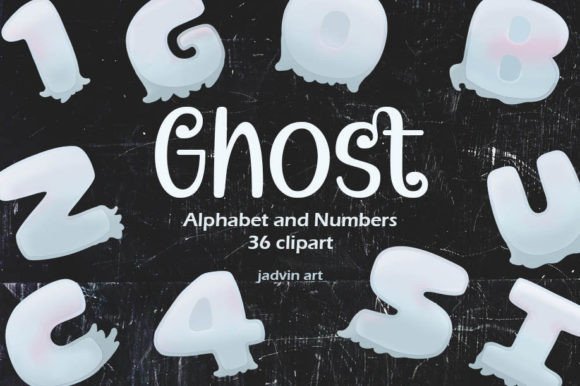
In the realm of digital design and physical crafting, asset selection is rarely just about aesthetics; it is about functionality and workflow efficiency. Ghost Alphabet and Numbers represents a specialized collection of typographic elements designed to bridge the gap between thematic Halloween creativity and professional-grade execution. For designers, educators, small business owners, and hobbyists, integrating these assets requires more than simply downloading a file. It demands an understanding of how high-resolution, transparent graphics interact with various design platforms, printing processes, and project timelines.
This guide explores the practical implementation of this clipart set, focusing on how to leverage its technical specifications—specifically the 300 DPI resolution and transparent PNG format—to enhance productivity and output quality across diverse mediums.
Understanding the Asset Specifications and Quality Control
Before integrating any digital asset into a production pipeline, verifying its technical integrity is crucial. The Ghost alphabet and number clipart is delivered as a zip file containing 36 individual PNG files. Each character is rendered at 3000px x 3000px with a resolution of 300 DPI (dots per inch). This specification is not arbitrary; it is the industry standard for high-quality physical printing.
For professionals working in print-on-demand, stationery design, or large-format wall art, maintaining 300 DPI ensures that edges remain crisp and details do not pixelate when scaled. The transparent background is equally significant. It eliminates the need for manual background removal in software like Adobe Photoshop or Affinity Photo, saving considerable time during the compositing phase. When you mix and match different elements, the transparency allows for seamless layering over complex textures, such as fabric patterns, paper grains, or photographic backgrounds, without creating unnatural white boxes around the letters.
Pre-Production: Planning and Compatibility Checks
Effective use of Ghost Alphabet and Numbers begins with preparation. Whether you are designing a digital invitation or a physical scrapbook, assessing software compatibility is the first step. PNG files are universally supported across major design platforms, including Canva, Procreate, Adobe Illustrator, InDesign, and Cricut Design Space. However, the workflow differs slightly depending on the tool.
- Vector-Based Software: If you are using Illustrator or Inkscape, note that PNGs are raster images. While they can be placed and scaled down effectively, scaling them up beyond their original 3000px dimensions may result in quality loss. Plan your layout size accordingly before importing.
- Raster-Based Software: In Photoshop or Procreate, these files function as independent layers. Organize your layer hierarchy early. Group alphabet layers separately from numerical layers to streamline edits during the design process.
- Cutting Machines: For users of Cricut or Silhouette machines, PNGs with transparent backgrounds can be used for "Print then Cut" projects. Ensure your software settings are configured to recognize the transparency to avoid cutting around unwanted white space.
Organizing your files before starting the project enhances efficiency. Unzip the archive into a dedicated folder labeled by project name. Consider renaming files if your workflow benefits from alphabetical sorting (e.g., A.png, B.png) rather than generic numerical filenames, although most modern design tools allow for easy visual identification.
Integration into Digital Design Workflows
For bloggers, marketers, and web designers, the Ghost alphabet and number clipart offers a versatile solution for seasonal content creation. The primary advantage here is speed. Instead of creating custom typography from scratch, which can take hours, you can assemble headlines, banners, and social media graphics in minutes.
When designing for web use, remember that screen resolution typically requires 72 DPI. However, starting with a 300 DPI source file allows you to scale down without losing clarity, ensuring your graphics look sharp on retina displays. Use the numbers to create countdowns for Halloween events, sales promotions, or advent-style calendars. The ghostly aesthetic provides a consistent visual theme that reinforces brand identity during the October season.
Mixing and matching elements is key to creating unique compositions. Do not feel constrained to use the font in a linear fashion. Overlap letters slightly to create a cohesive wordmark, or scatter numbers randomly to create a dynamic background pattern. Because each character is a separate file, you have total control over rotation, opacity, and color adjustment. Applying a slight drop shadow or outer glow in your design software can help the white or light-colored ghost letters stand out against darker backgrounds, improving readability and visual impact.
Application in Physical Crafting and Print Production
The transition from digital file to physical product is where the 300 DPI resolution proves its value. For papercraft creators, cardmakers, and scrapbookers, the Ghost Alphabet and Numbers can be printed on various media types, including cardstock, vinyl, and adhesive paper.
Cardmaking and Invitations
When creating Halloween invitations or greeting cards, consistency in style is essential. Use the alphabet to spell out names or messages, ensuring uniform spacing (kerning) manually since these are individual image files. Print a test sheet on standard paper to check alignment and size before committing to expensive cardstock. The transparent background ensures that if you are printing on colored paper, the ghost effect blends naturally with the substrate, rather than appearing as a stamped box.
Wall Art and Decor
For larger projects like wall art, scale is critical. At 3000px, you can print each letter at approximately 10 inches wide at 300 DPI. If you need larger letters for a banner, consider printing at 150 DPI, which is often acceptable for large-format viewing distances. Arrange the letters on your canvas or paper before adhering them permanently. This "dry fit" stage allows you to adjust spacing and alignment, ensuring a professional finish.
Fabric and Sublimation Printing
Entrepreneurs producing custom apparel or home decor can utilize these PNGs for sublimation printing. The high contrast of the ghostly design works well on dark fabrics, but remember that sublimation requires mirror-image printing. Always flip your canvas horizontally before printing onto transfer paper. The transparency ensures that only the inked design transfers, leaving the fabric texture visible in the negative spaces, which enhances the eerie, ethereal quality of the ghost theme.
Enhancing Educational and Journaling Projects
Educators and parents can integrate these assets into learning activities. The playful yet spooky nature of the font engages children while teaching alphabet recognition and counting. Create worksheets, flashcards, or interactive classroom decorations. For journaling enthusiasts, the numbers are ideal for dating entries or creating themed spreads in bullet journals. The transparent PNGs can be dragged and dropped directly into digital planning apps like GoodNotes or Notability, allowing for endless customization without the bulk of physical stickers.
Troubleshooting and Best Practices
To ensure a smooth experience, keep the following practical tips in mind:
- File Management: Keep the original zip file as a backup. Working copies should be saved in your project folder to prevent accidental overwrites.
- Color Consistency: If you need to change the color of the ghosts, use the "Hue/Saturation" or "Color Overlay" features in your design software. Avoid simply painting over them, as this can obscure the detailed texture.
- Resolution Checks: Always verify the final export settings. For print, ensure PDF or TIFF outputs are set to 300 DPI. For web, export as PNG or JPG at 72 DPI to optimize load times.
- Licensing and Usage: Respect the creator's terms. If you have special requests or need clarification on commercial use, contact the seller directly as indicated in the product description.
Conclusion: Streamlining Seasonal Creativity
The Ghost Alphabet and Numbers clipart set is more than a decorative addition; it is a functional tool that streamlines the creative process. By understanding the technical specifications and integrating these assets thoughtfully into your workflow, you can produce high-quality, professional results across digital and physical mediums. Whether you are a marketer launching a Halloween campaign, a teacher creating engaging materials, or a crafter designing unique gifts, this collection offers the flexibility and quality needed to execute your vision efficiently. Focus on preparation, leverage the transparency and resolution advantages, and experiment with composition to maximize the potential of these ghostly elements.